In the highly competitive world of e-commerce and online visibility, internal linking remains one of the most powerful yet underutilized SEO levers. With Chrono SEO, optimizing your internal linking goes far beyond adding a few links: it means smartly structuring your site, boosting your strategic pages, and guiding both Google and your visitors to the content that truly matters. How can you master this art in 2024, beyond basic advice? Discover advanced internal linking strategies, tailored for e-commerce and showcase websites, to propel your organic search performance.
What Is Internal Linking and Why Is It Vital for SEO?
Internal linking refers to the set of hyperlinks connecting pages within the same website. These links are essential because they:
- Facilitate user navigation and enhance the overall experience.
- Enable search engines to crawl and index pages more efficiently.
- Pass link equity (“link juice”) to your most important pages.
- Clarify the hierarchy and semantic structure of your site.
Effective internal linking helps your key pages rank higher in search results, decreases bounce rates, and increases time spent on your site. For e-commerce, it's especially strategic, allowing you to promote top products, categories, or brands and ultimately drive more conversions.
Core Principles of Effective Internal Linking
Before diving into advanced tactics, let’s recall some essential basics:
- Link relevance: Every link should add real value for the user, helping them dig deeper or discover complementary products.
- Anchor diversity: Use varied, descriptive, and natural anchor texts relevant to the target page.
- Balance: Too many internal links on a single page can dilute SEO impact; too few limit link equity flow.
- Depth: Minimize the number of clicks needed to reach each important page.
Advanced Internal Linking Techniques to Boost SEO
1. Silo Architecture: Building Strong Thematic Clusters
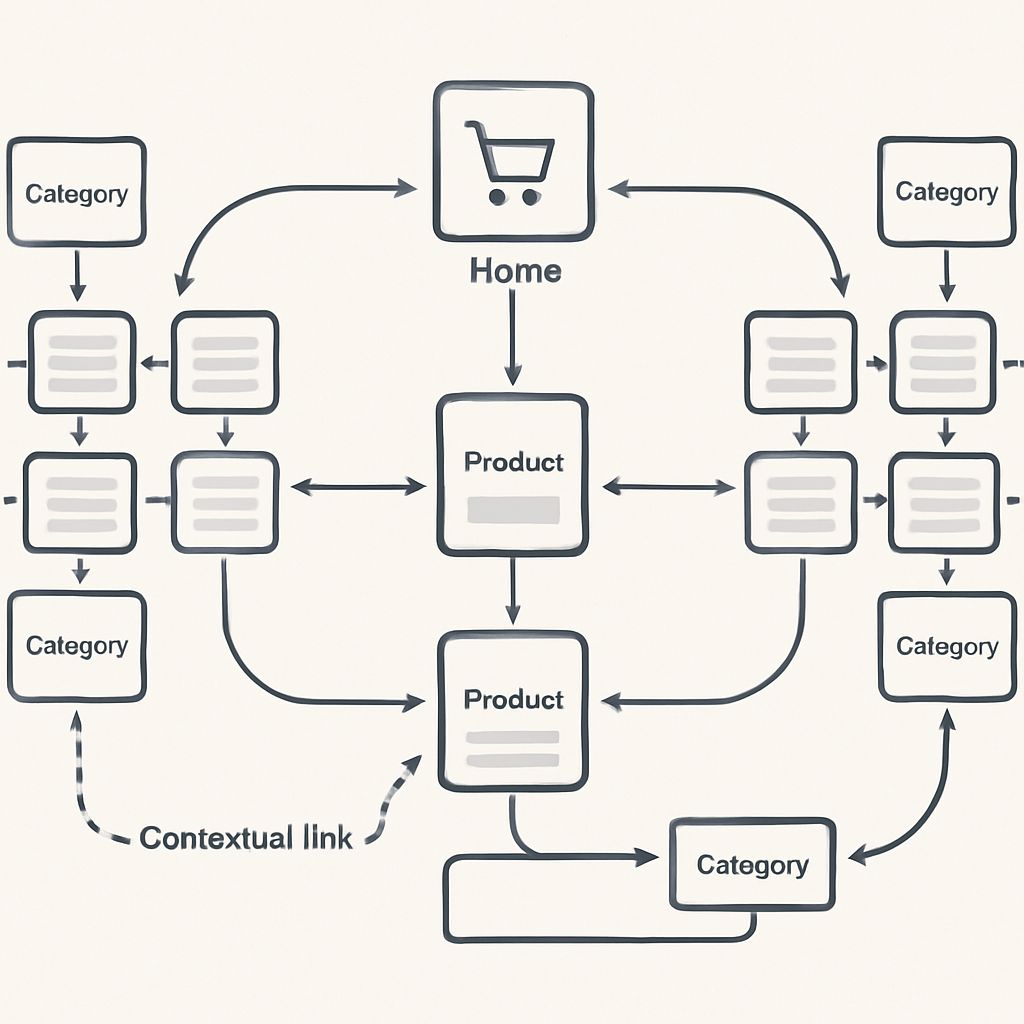
Silo architecture groups your site’s content into coherent themes (“silos”), each cluster being linked to a main parent page (category) and child pages (blog posts or product pages). This organization makes your site easier for Google to understand and strengthens topical relevance.
For example, on a sports e-commerce site, you might create a “Sports Shoes” silo linked to subcategories like “Running,” “Basketball,” and “Hiking.” Each product page, such as the lightweight running shoe, naturally links to its category but also to buying guides or blog posts like how to choose your sports shoes.
2. Pillar Pages and Satellite Content: Building Semantic Authority
Identify your pillar pages: high-value pages that cover core topics related to your business (e.g., a comprehensive guide to e-commerce SEO). These belong at the heart of each cluster. Satellite pages (specific articles, product pages, subcategories) then deepen the topic. Link satellites to the pillar page with relevant internal links and, in turn, have the pillar page link back to them to reinforce the whole cluster.
Chrono SEO’s automated enrichment and internal link suggestions help you build this network efficiently. Use varied anchor texts like optimize your title tag or e-commerce content strategies to avoid over-optimization.
3. Advanced Contextualization of Internal Links
A well-placed link within a rich and relevant semantic context carries much more weight with Google. Insert your internal links in paragraphs that genuinely address the target topic, naturally weaving in secondary keywords and synonyms. For example: “To learn more about internal linking on product pages, check out our practical tips.”
4. Optimizing Internal Linking on Strategic Pages
An e-commerce site’s strategic pages (homepage, main categories, flagship product pages, buying guides) should both receive and emit more internal links. With Chrono SEO, you can:
- Link products by shared criteria (same category, brand, or technical specs).
- Bridge blog articles and product pages to boost reciprocal SEO.
- Add links to advice or FAQ pages, such as writing an effective meta description.
5. Smart Use of Optimized and Natural Anchors
Vary anchor texts to reflect diverse search intents. Mix exact-match anchors (e.g., “advanced internal linking”), long-tail anchors (e.g., “how to optimize internal linking for SEO”), and semantic variants (e.g., “structuring internal links,” “improving navigation”). This fosters long-term SEO and reduces over-optimization risks.
6. Dynamic and Automated Internal Linking with Chrono SEO
Manual link management can be daunting for large sites. Chrono SEO provides advanced automation: page analysis, relevant link suggestions, automatic enrichment of product pages and blog posts, and post generation for social networks with strategic links.
Thanks to built-in AI, the module identifies the best internal linking opportunities, offers varied anchor texts, and updates links as new content is added. This ensures an evolving, coherent, high-performing network with no technical effort required.
7. Leveraging Orphaned and Deep Pages
Orphaned pages (not linked internally) or deep pages (more than three clicks from the homepage) often escape indexing and SEO value. Identify them via an audit (possible with Chrono SEO) and strategically link them from high-traffic pages or relevant thematic clusters. For instance, if an innovative product page is underexposed, add a link from a buying guide or suitable category page.
8. Comparative Tables and Contextual Navigation
For rich categories, offer comparison tables featuring links to product pages or related articles. For example, a table comparing different SEO solutions for e-commerce can direct users to the most suitable product page.
| SEO Tool | Main Feature | Site Type |
|---|---|---|
| Chrono SEO | Automated internal linking | E-commerce, showcase |
| SEO Booster | Semantic analysis | All types |
| Content Optimizer | Content enrichment | Blog, e-commerce |
This type of contextual navigation helps users discover complementary content, encourages cross-selling, and strengthens thematic consistency.
9. Using FAQs and Rich Content to Create Link Opportunities
FAQ sections and rich content are perfect opportunities to add natural internal links. Each question can point to a blog article, category page, or in-depth guide, deepening navigation and boosting user engagement. For example: “How to choose the right SEO extension? See our complete guide to SEO plugins.”
10. Tracking, Analysis, and Ongoing Improvement
Regularly analyze your internal linking performance: most linked pages, most clicked links, bounce rates, orphaned pages. Tools like Chrono SEO provide detailed reports and continuous improvement suggestions. Adjust your strategy according to product catalog changes, search trends, and observed performance.
Case Study: Optimizing E-commerce Internal Linking with Chrono SEO
Imagine an e-commerce site specializing in high-tech accessories. The goal: highlight new products and boost their search engine visibility. Here are the key steps:
- Automatic audit: Use Chrono SEO to identify orphaned pages and under-optimized clusters.
- Page enrichment: Add internal links from category pages to new arrivals and vice versa, creating effective navigation loops.
- Blog content creation: Automatically generate blog posts on topics related to new arrivals, including links to relevant products and categories.
- Social media promotion: Publish impactful posts with embedded links to amplify visibility of important pages.
- Analysis and adjustment: Monitor performance indicators and refine your linking over time.
This automated, intelligent approach improves SEO, boosts visibility for key products, and delivers an optimal user experience.
Common Internal Linking Mistakes to Avoid
- Adding multiple links to the same page within a single content piece, which dilutes SEO impact.
- Using generic anchor texts (“click here”, “read more”), which have little value for Google.
- Neglecting deep or orphaned pages.
- Ignoring product catalog and search trend changes.
- Lacking thematic coherence: linking pages without a clear semantic logic weakens the structure.
Frequently Asked Questions About Internal Linking and SEO
There’s no universal number. Prioritize relevance and quality over quantity. Generally, 3 to 10 well-contextualized internal links per page are sufficient, depending on content length and type.
Absolutely. Even sites with few pages benefit from internal linking: it improves navigation, indexing, and SEO, and prepares for future growth.
With intelligent tools like Chrono SEO, automation is based on contextual relevance, avoiding over-optimization and ensuring a natural, effective internal structure.
Yes—well-optimized internal linking helps Google understand your site’s structure and prioritize key pages, improving their search ranking.
Ideally, balance links to product pages, categories, and blog articles. This boosts overall site authority and guides users according to their needs.
Conclusion: Make Internal Linking Your SEO Powerhouse with Chrono SEO
Internal linking is far from a mere technicality—it’s a foundational pillar of any successful SEO strategy. By applying the advanced techniques outlined above and leveraging Chrono SEO’s smart automation, you can structure your site, boost the visibility of key pages, and provide a seamless user journey. Don’t wait—analyze, optimize, and evolve your internal linking: turn every link into a growth lever for your e-commerce business.
Get started with Chrono SEO today and automate your internal linking strategy!